Enterprise-Grade Migration,
Beautifully Simple
See how SP Toolkit transforms complex migrations into guided, validated workflows and smart automation.
10-Step Guided Wizard
From strategy definition to execution results, every step validates and guides your migration.
Pre-flight Validation
Catch schema conflicts, missing lookups, and risky configurations before any data moves.
Smart Field Mapping
Automatic field matching and type-aware suggestions reduce manual configuration by up to 80%.
Throttling Protection
Balanced throughput presets prevent 429 errors while maximizing migration speed.
Version History
Preserve document versions and list item history across tenants.
Data Transformation
Apply rules to normalize, transform, or filter data during migration.
Test Data Generator
Generate realistic sample data for development, testing, and demos.
Migration Profiles
Save and ship reusable migration configurations with your products.
Detailed Reporting
Comprehensive results with export options for auditing and compliance.
CSV Import
Import CSV data into any list with automatic field mapping and validation preview.
Data Import Hub
Nine sources (CSV, Excel, JSON, folders, ZIP, OneDrive, Google Sheets) into any SharePoint list or library. Auto-batching, throttle-aware upload, no total-run size limit.
Document Migration at Scale
Same-tenant document migration using SharePoint's native server-side copy — version history preserved automatically. Optional large-file fallback handles files up to 250 GB (chunked through the browser as a fresh v1.0). Resumable across libraries of any size.
10-Step Guided Migration
From initial strategy to final validation, every step is designed to prevent errors and ensure successful migrations.
Migration Workflow
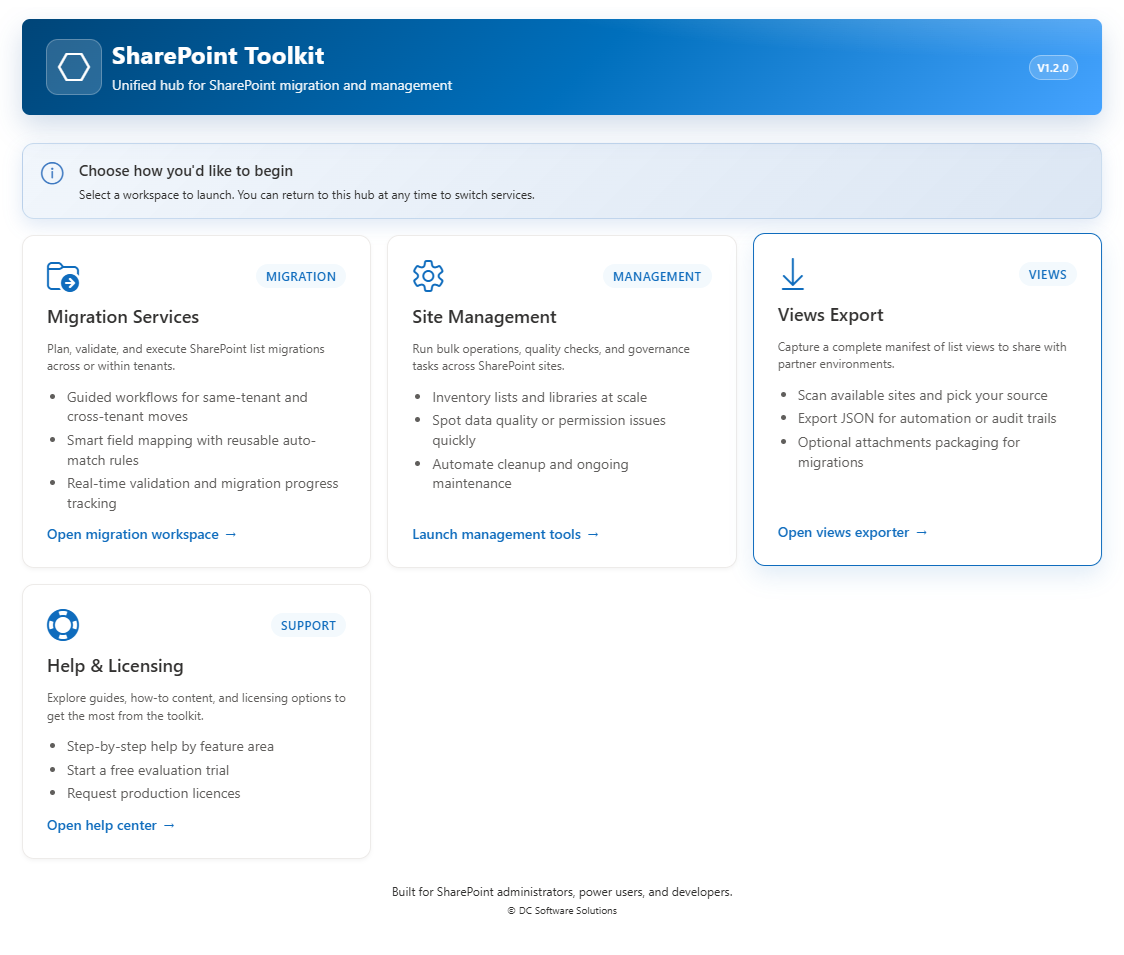
Service Hub
Choose your workspace: Migration, Site Management, Views Export, or Help & Licensing
Complete Toolkit for Daily Operations
Beyond migration: create lists, design blueprints, run bulk operations, sync data, and optimize your SharePoint environment.
Site Management Tools
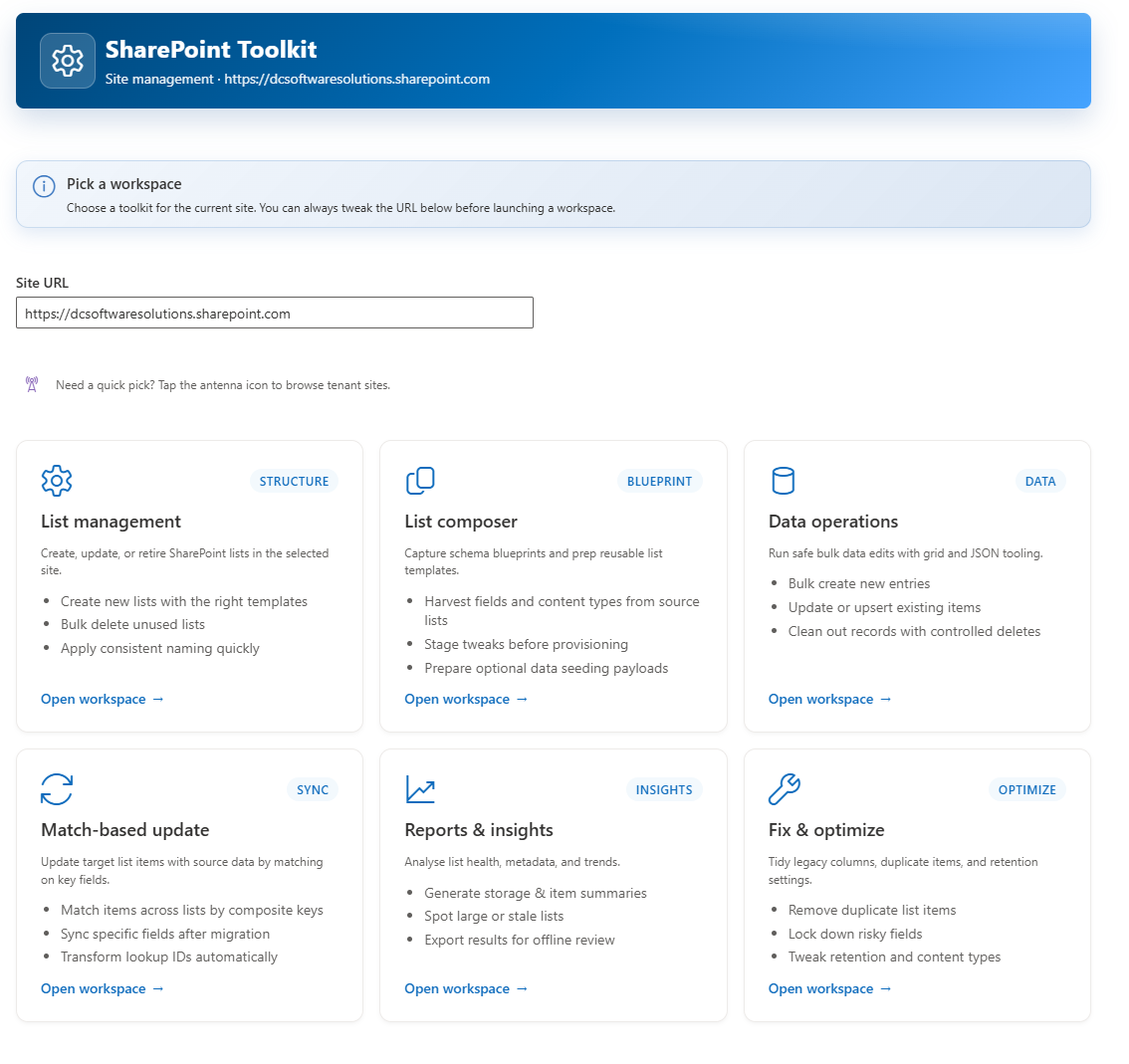
Site Management Hub
10 specialized workspaces for list operations, blueprints, data ops, match-based sync, CSV import, data export, reports, cleanup, and Version Insights & storage governance
Find any document or email — anywhere in your tenant
Full-content search across every SharePoint site your account can see, plus any mailbox you have access to. Search inside your files and emails — not just filenames and subject lines. A visual query builder generates the KQL for you, so the power of SharePoint Search is one click away without a syntax cheat sheet.
Discovery Workspace — quick tour (scope your search, run a query, copy every match into a working library with metadata preserved).
Full-content search, not just filenames
Powered by SharePoint's search index. Word, Excel, PowerPoint, PDF, plain text and more, with the content read by Microsoft's iFilters. Find every file mentioning a client name, contract number, or phrase you know appears inside.
Visual query builder — KQL without the syntax
Add must-contain phrases, must-not-contain phrases, exact phrases in quotes, file types, and date ranges through simple form fields. The workspace generates the KQL underneath, so you don't need to remember filetype: or AND NOT operators.
Live KQL preview
Every field you fill in updates a live preview of the exact query about to be sent to SharePoint. Copy it out to run in other tools, or use it to verify the search is doing what you expected before you hit Run.
Whole tenant, one site, or specific libraries
Default scope is your entire tenant. Narrow with one click by adding a whole site as a scope, or tick individual libraries. An amber banner tells you exactly what's about to be searched.
Multi-phrase logic — AND, OR, NOT
Every must-contain phrase is AND-combined; every must-not-contain phrase is AND-NOT-combined. Quoted phrases search as exact strings. File-type and date filters apply on top. Complex boolean searches you'd normally hand-write in KQL become a few form fields.
File-type and date filters
Restrict to .docx, .xlsx, .pdf, .pptx and other common types. Filter by created-date or last-modified-date range — useful for freezing a search inside a specific matter, project, or reporting period.
Email tab — same job, different corpus
Search any mailbox you have Full Access to via Microsoft Graph. From, subject, received-range, has-attachments filters. Copy hits as .eml files into a working library with columns for From, Received, To, and a MessageId column that dedupes on re-runs.
Copy every match into a working library
File, metadata, columns, authors, dates — all preserved. Tick 'Clone fields' to bring your custom tags across. One library, one place, ready to hand to a colleague, client, or auditor. Not a screenshot of a search results page.
Every capability above is included in the free trial. For eDiscovery, subject-access requests, compliance sweeps, and audit trails — built for accountants, legal firms, insurers, and anyone who needs to find things fast. OneDrive and Teams are next.
Bring anything into SharePoint — from anywhere
CSV, Excel, JSON. Folders from network shares or local drives. ZIP archives. OneDrive files, folders and full user drives. Google Sheets. One import surface, one browser session, one destination — no third-party ETL, no PowerShell.
Data Import Hub — quick tour (folder → SharePoint document library, auto-batched, throttle-aware).
Nine sources, one pipeline
CSV, TSV, Excel (any sheet), JSON, folder trees, ZIP archives, single documents, OneDrive files, OneDrive folders, whole OneDrive user drives, and Google Sheets. All share the same downstream mapping and preview.
Auto-batching — no total-run cap
Oversized selections split automatically into 15 GB batches (adjustable 1–20 GB). Batches 2+ skip existing files, so an overnight run resumes cleanly. Real-world: 29 GB in under 2 hours from a local folder.
Adaptive throttle governor
Every large tenant hits SharePoint throttling. The upload governor watches for 429s and Retry-After signals, halves the worker pool when throttling clusters, then ramps back after a 50-success streak. No operator tuning.
Four import modes
Insert, Update, Upsert, Delete. Update/Upsert lookups match by any column you pick — not just Id. Perfect for keeping a SharePoint list synced with an external system.
Field mapping with preview
See mapped rows before you write. Configure date formats, empty-string handling and conflict behaviour. Round-trip detection when the file is an SP Toolkit export.
OneDrive Migration Projects
Save a project for each departing user's OneDrive. Baseline copy, then delta-syncs, then a retry pass — all from a dashboard. Resumable, cap-aware, session-scoped.
File-legality guardrails
On-prem shares carry filenames SharePoint rejects — the hub flags illegal characters, path-length limits, and blocked extensions before the upload starts, not halfway through.
Live activity feed + downloadable report
Per-file progress with pause / resume / cancel, and a Markdown report at the end covering everything created, skipped, and failed. Perfect for change-management sign-off.
Free trial covers every source. See exactly how much your team can bring into SharePoint in a single browser session.
Move thousands of documents between SharePoint sites — at scale
Same-tenant document library migration using SharePoint's native server-side copy. Version history preserved automatically. Parallel workers, auto-batching for huge libraries, resumable after any failure. Bytes never leave your Microsoft 365 tenant.
Server-side copy — bytes never leave SPO
Uses SharePoint's native File.copyByPath. Documents never round-trip through the browser or your network. Fastest possible same-tenant path.
Version history preserved automatically
Same-tenant copy retains every historical version at the source's original timestamps and authors. Optionally trim the target to the last N major versions after the copy.
250 GB max file size
Server-side copy caps at ~2 GB per file — Teams Screen Recordings and long-form video routinely exceed this. Large-file fallback (default on) copies oversized files through the browser as a chunked upload, up to 250 GB per file.
Auto-batching for huge libraries
Libraries over 50 000 files auto-split by top-level folder into cap-sized batches. Leave a multi-terabyte reorg running overnight — the browser tab is the only limit.
Parallel workers, adaptive throttle
6 copy workers by default (adjustable 1–12). When SharePoint throttles cluster, the pool halves automatically then ramps back — no per-tenant tuning.
Resumable — safe to re-run
skipIfExists is on by default. Browser crash, laptop sleep, or network drop? Re-pick the same libraries and the run resumes exactly where it stopped.
Folder-scoped runs
For a single source library, an optional 'Source subfolder' field scopes the copy to a path like 'Engineering/2024'. Migrate a huge library one folder at a time without exceeding tenant storage.
Markdown migration report
Every run produces a downloadable batch summary + per-library breakdown, with copied / skipped / failed file tables. Perfect for change-management sign-off.
Free trial covers same-tenant document migration end-to-end. Every capability above works during the trial.
Tame version bloat without leaving your browser
Audit every list and library on a site, sample real version counts, scan library storage, and trim safely with preview + suggested keep-N. All in-browser, read-only until you commit — no server-side app registration required.
Site-wide audit at a glance
One click surfaces every non-hidden list and library with its versioning setting, item count, major/minor limits, and links straight into SharePoint.
Actual version counts, sampled
Sample 3–100 items per list and see the real max / avg version count. Sequential (oldest) by default, or flip on Random for a truer picture on long-lived lists.
Storage scan for libraries
Sum every file's byte count across selected libraries and sort by size — turn a versioning conversation into a storage-cost conversation with actual numbers.
Trim preview before you commit
Dry-run the trim across your selection and see exactly how many versions would go before touching a single item. Re-run with different keep-N values for free.
Suggested keep-N
Once you've sampled, the trim dialog proposes a defensible keep-N (⌈avg × 3⌉, floor 5, ceiling = configured limit). Click 'Apply' to accept — you're always in control.
Migration hand-off with an estimate
Before switching to Migrate Documents, see list count, item count, and estimated versions to replay — with a warning if any selected list is unsampled.
CSV export & inline SharePoint links
Export the filtered view to CSV for stakeholder reports. List names, item counts, and version-settings pages all deep-link to SharePoint in a new tab.
Sortable columns, amber/red highlights
Sort by any column, including sampled versions and storage. Cells turn amber within 5 of the limit and red at/over — an instant visual triage.
Preferences are persisted per site for the browser session, and a warning banner appears when any selected list has 5 000+ items so you can plan for out-of-hours.
Built for Enterprise IT
Every feature designed with security, compliance, and scale in mind.
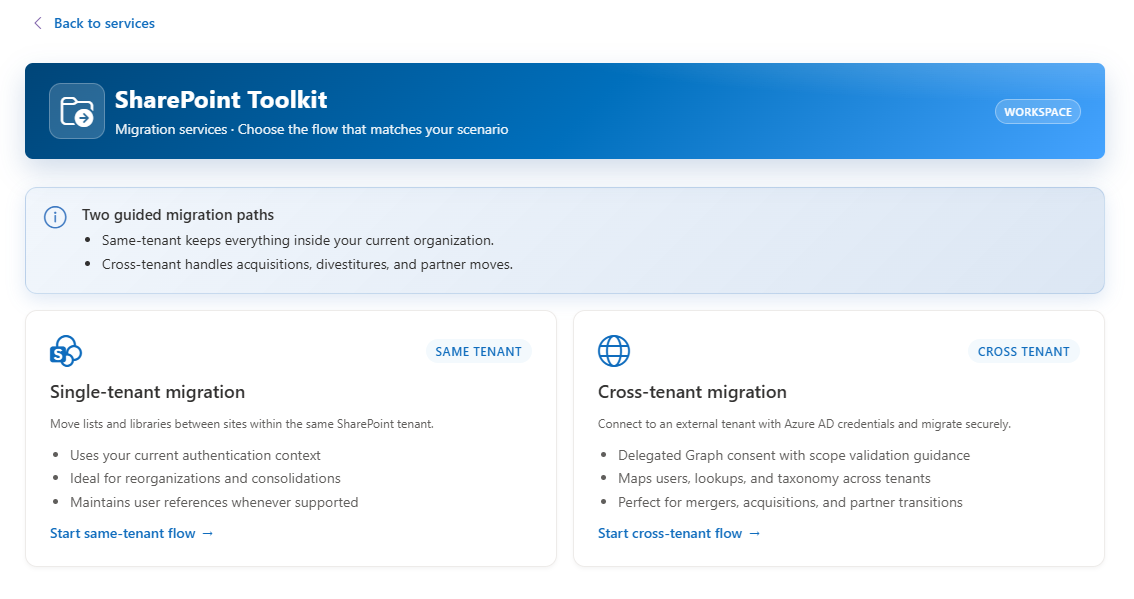
Mergers, Acquisitions & Divestitures
- Delegated Graph consent with scope validation
- User and lookup mapping across tenants
- Taxonomy and managed metadata preservation
- Document version history migration
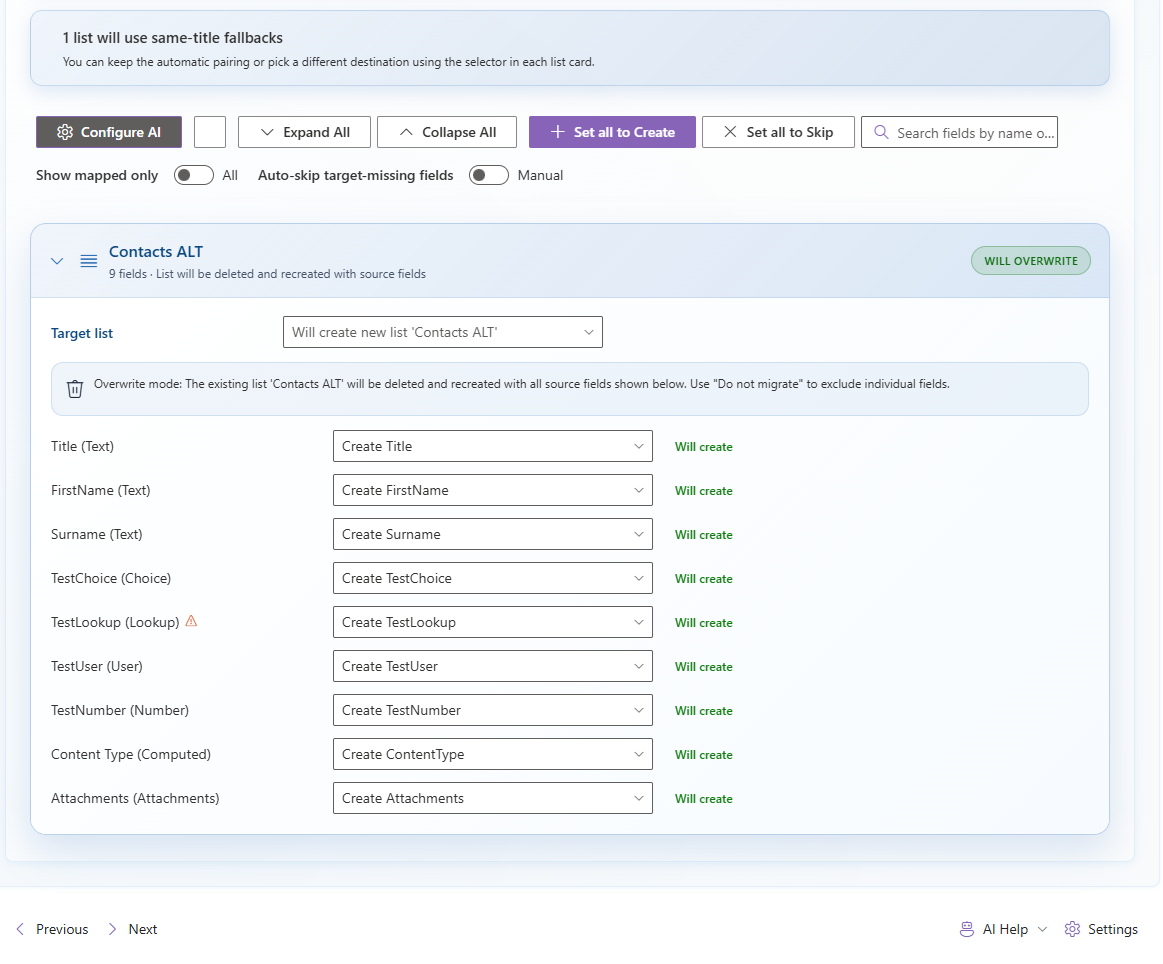
Intelligent Field Mapping
- Automatic field matching by name and type
- Type-aware suggestions for ambiguous mappings
- Reusable mapping profiles across migrations
- Manual override controls for complete flexibility
Powerful Test Data Generation
Generate realistic sample data for development and testing without manually creating items. Perfect for validating migrations, testing workflows, or populating demo environments.
- Smart field-type-aware data generation
- Configurable row counts, prefixes, and date ranges
- Sequential or randomized values for realistic datasets
- Template-based content generation for all field types
Test Data Generator
Built into Data Operations
Generate 100+ test items with realistic Choice, Date, Number, and Text values in seconds
Supports all 22+ SharePoint field types with appropriate sample data
Migration Profiles
Save, load, and share configurations
Package complete migration configurations including field mappings, data rules, and settings
Export as JSON files to ship with your own products or share with partners
Save & Ship Migration Profiles
Create migration profiles once and reuse them across projects. Perfect for ISVs, consultants, and IT teams who need consistent, repeatable migrations.
- Save complete migration configurations to JSON
- Include field mappings, data transformation rules, and options
- Ship profiles with your own products for customer deployments
- Load and apply saved profiles to new migrations instantly
Comprehensive Migration Reporting
Full visibility into every migration with detailed reports, real-time progress tracking, and exportable results for stakeholder communication and compliance.
- Real-time progress with per-item status tracking
- Detailed error logs with actionable remediation guidance
- Export results to CSV, Excel, or JSON for auditing
- Migration summaries highlighting key outcomes and success rates
- Site inventory and health reports for management visibility
Reports & Insights
Full migration visibility
Migration result summaries with success rates, error breakdowns, and timing metrics
Site inventory reports showing list counts, item volumes, and storage usage
Automation & Migration Templates
Skip manual configuration with pre-built templates, validate before you migrate, get notified when runs complete, and maintain a full audit trail — all built in.
6 Pre-Built Templates
CRM, Projects, Documents, Helpdesk, HR, Inventory
- Includes field mappings, data transform rules, and recommended options
- Browse by category with difficulty badges (beginner → advanced)
- Fully customisable after loading — tweak anything before you run
Template Fitness Report
Validate before you migrate
- Auto-checks profile expectations vs actual source environment
- Detects missing lists, absent fields, choice drift, and type mismatches
- One-click "Go to step" navigation to fix each finding
Webhook Notifications
Teams, Slack, Power Automate, or custom
- Automatic alerts when migrations succeed or fail
- Platform-native formatting (Teams MessageCard, Slack Block Kit)
- HMAC-SHA256 payload signing for endpoint security
Execution History
Full audit trail for every run
- Automatic tracking of status, duration, item counts, and errors
- Export to CSV or JSON for compliance and project documentation
- Up to 50 runs retained with expandable detail view
No other SharePoint migration tool offers built-in templates with fitness validation, webhook notifications, and execution history in a single package.
CSV Import — Complete the Round-Trip
Export your list data, edit it in Excel, and import the changes back — all without scripting or Power Automate flows. The 6-step wizard handles validation, field mapping, and batched execution.
6-Step Guided Wizard
Upload → Target → Map → Options → Preview → Execute
- Drag-and-drop with auto-detected encoding, delimiter, and headers
- Automatic column mapper with type-aware matching
- Colour-coded preview: green (valid), amber (coerced), red (error)
Four Operation Modes
Insert, Update, Upsert, or Delete
- Match by ID, single field, or composite key
- Conflict handling: overwrite, skip blanks, or only changed values
- Smart round-trip detection pre-configures Update + ID key
Deep Validation
Every cell checked before writing
- Lookup resolution, person resolution, choice validation
- Date format auto-detection with multi-format support
- Free dry-run mode — full validation without writing data
Results & Reporting
Full visibility into every row outcome
- Success, failed, and skipped counts with error details
- Downloadable results CSV for audit trails
- Clear and start a new import without leaving the page
Export → Edit → Import. No scripting, no Power Automate, no Quick Edit limitations. CSV Import makes SP Toolkit a complete SharePoint data management tool.
Scheduled Migration Reliability
Schedule migrations to run at off-peak hours with confidence. v1.5.0 ensures field metadata is always available at execution time — even for deferred and queued runs.
Smart Field Re-Fetch
Before any data moves, SP Toolkit now verifies that complete field metadata is present for every source list — and re-fetches it automatically if missing.
Null-Safe Field Access
Defensive guards across all field metadata access points ensure no migration step crashes due to missing or undefined field arrays.
Validation Stability
Dependency analysis, merge-mode checks, and pre-flight validation all handle edge cases gracefully — no more crashes on incomplete list metadata.
Ready to See It in Action?
Start your 14-day free trial today or schedule a personalized demo with our migration experts.